With our Grand Photoshow 2022 opening tomorrow I know some people will be new to OMHPS and thought I would do a quick post to talk you through the basics of using it.
Note: I have premium membership so your pages may look slightly different to mine, but the basic concept is the same :)
Signing Up
Step 1
Visit www.omhps.com
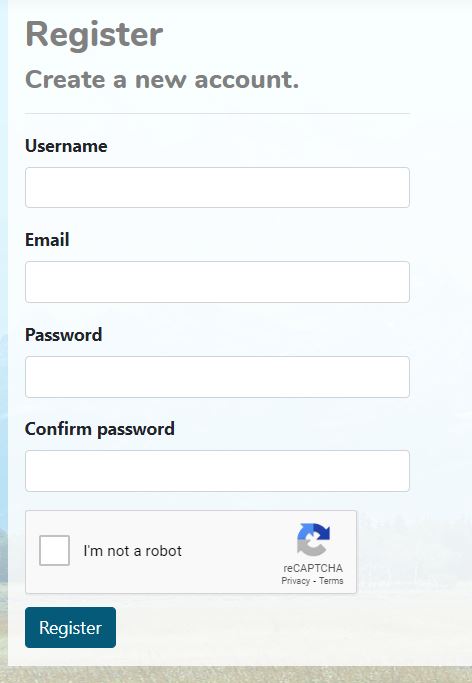
Click on 'Register'
Step 2
Fill in your account details and then click 'register'. Your account will need approval, so go through all the relevant steps to verify your account (the same as pretty much every other website)
Uploading a Horse
Step 1
Login to your account and then click on 'My Horses' at the top of the page
Step 2
Click 'Add Horse' just under your username
Step 3
This will bring you to a page like this
1: This is where you enter your horse's name
2: You can add anything to the description or you can just leave it blank. Sometimes I add in the horse's stable name to help me remember who is who
3: Use the drop down list to select the make of your horse
Makes are general e.g. Original Finish China, this helps your horse go into the right sections
4: Use the dropdown list to select your horse's breed, you can search by typing into the search box
5: If your horse is a crossbreed enter what they are crossed with here
Important note: Leave blank if your horse is purebred!
6: Enter the scale of your model
7: Enter the gender of your model
Step 4
Here is my completed page, the horse I'm using is an OF Beswick Arabian. You can see how I've entered the name and then used the drop down lists to select each of the items.
Note how the crossbreed section is blank because she is purebred!
Step 5
Scroll down to add your image
1: This is the main image that will be used for showing
2: You can add alternative images, these are good for things like headshots or specialist images for certain shows
Step 6
Click on 'Choose File' to upload your photo
Step 7
Select the photo you want
Click 'open'
Step 8
You should now get a preview of your image that looks like this
Say hello to CRS Love Has Won
Step 9
You can stop there if you want or you can add some extra information about your model. You can enter workmanship, collectability and performance photos.
1: This is where you enter the main information for your horse
2: If you have a reference picture or description you can add it here
3: Add workmanship details here
You need to do this for OF models as well as CM as some shows have OF Colour classes
4: Add collectability information here
5: Once your horse has been created you can add performance photos here
6: You can add non-OMHPS show records through this tab
Step 10
Click on 'References'
Click choose file to upload a reference picture if you have one
I don't - she's just a plain bay Arab, so I'm leaving this blank!
Step 11
Now we are going to add Workmanship information
Remember - you need to add this for OF horses as well as CM if you want to maximise the number of classes you can enter
1: Add your horse's base coat colour here
2: Add the pattern here
Note! You need to select 'solid' in this box if your horse is a solid colour!
3: Add the medium here
4: Click this box to use the horse's main image, you can upload a separate image if you want
Step 12
Here is Love Has Won's details, note how I've selected to use the main image and put her pattern as solid
Step 13
We are now going to add collectability information
1: Type in the year the model was introduced
2: Type the year the model was retired here
3: Select the 'run type' here
4: Use the drop down menu to select how many were produced
Step 14
Here is Love Has Won's information
Step 15
We are now finished! Just click 'create' at the bottom of the page to add your horse
Step 16
Click that you aren't a robot (unless you are one, in which case soz bro)
Then click 'create'
Step 17
The final page should look like this, as your horse is entered into shows you will see cute little ribbons appear in the awards box.
Entering Shows
There are two methods to entering shows. You can either do this from the horse's information page, or you can enter it from the shows page. Let's start by entering Love Has Won into a class.
Step 1
At the bottom of your horse's information page click 'See Classes'
Step 2
You should get a page that looks something like this, it will have all the open shows listed below
Step 3
Click the little + symbol next to the show you want to enter
Step 4
Next to the class you want to enter your horse into click 'Enter'
Note: Usually the only classes that will show are the ones that you horse is eligible to enter BUT there is a function for show hosts to click 'no strict' entries, this means it will show EVERY CLASS, which is super annoying, so you may have to scroll down to find the right one!
Step 5
On the pop up you can select to use an alternative image if you'd like or just click 'enter' to use the main image
Step 6
It will now show the class like below to show that the horse has been entered
Step 7
Now let's look at how we enter via the shows page. At the top of the page click on 'Shows'
Step 8
From the dropdown click on 'Shows'
Step 9
This will show all of the current shows, this includes upcoming, closed and currently running shows
Hey look my show is there!
Step 10
On the tab at the top click 'Open Shows'
This will open all of the show that you can actually enter at that time
Step 11
Find the show you want to enter and click on it
Some shows will have paid for entries, or limited entry lists and some will be free and open to all. Read the show info to see if there are any extra steps you need to take in order to be able to enter.
Step 12
On the class list click the little + next to the division you want to enter
Step 13
Now click the + next to the section you want to enter
Step 14
Find the class you want to enter and click 'Enter'
Step 15
You will get a page that allows you to see:
Eligible Horses: Horses you can enter
Currently Entered Horses: Horses you have already entered
Ineligible Horses: Horses that can't enter
Click the + next to eligible horses
Step 16
Scroll down to the horse you want to enter and click 'enter'
Step 17
On the pop up you can select whether you want to use an alternative image or the main image
It can be slow to load hence why you can't see the image here!
Click 'enter'
Step 18
It should now show your horse as entered
Hey look it loaded the image!
I hope this has helped those who are new to OMHPS
Remember the Chestnut Ridge Grand Photoshow opens tomorrow. Full details can be found here: https://www.chestnutridge.co.uk/grand-photoshow.html#/